

Editing Device State
In the Partner Portal, navigate to a Sandbox subscription’s device connections. Clicking on a linked virtual device opens an editing dialog where you can modify the device’s data model. The dialog displays the full data model of the device, organized into sections such as General Info, Charge State, and Climate State. Most fields can be freely edited to simulate any device scenario you need.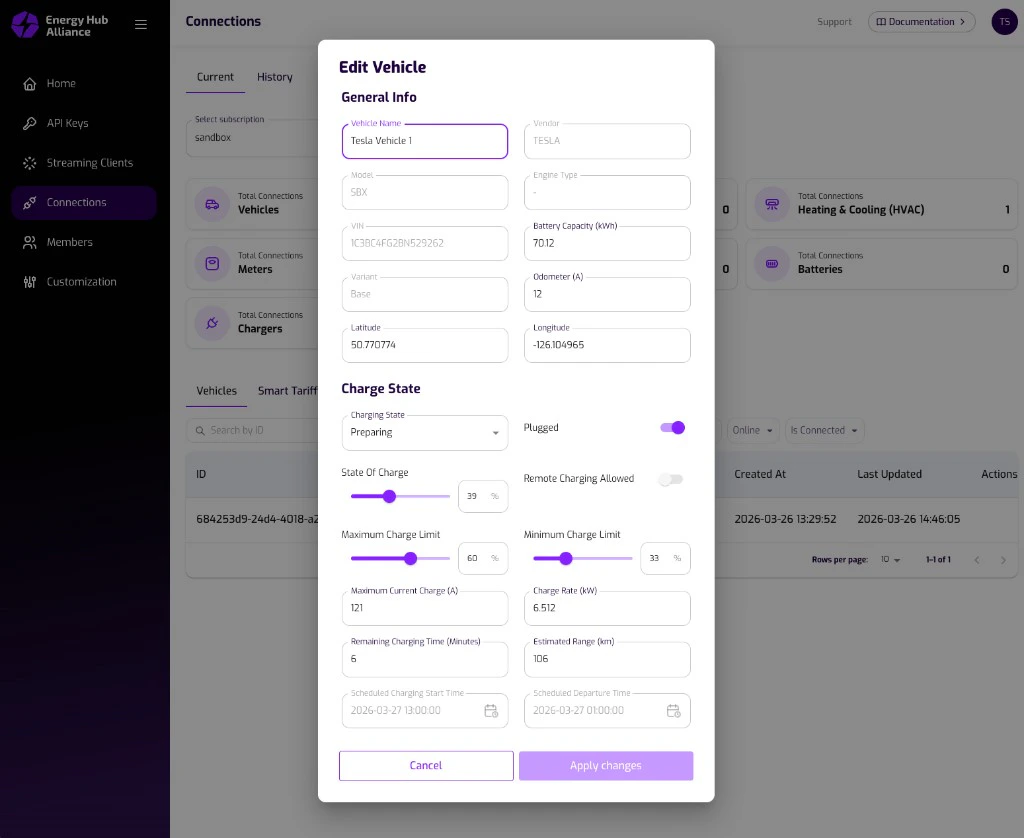
Read-Only Fields
Some fields are managed by the system and cannot be edited manually:Editable Fields
All other fields in the data model can be modified. For a vehicle, this includes fields such as vehicle name, model, VIN, battery capacity, charging state, state of charge, charge rate, temperatures, climate settings, and more. The complete data model is documented in the Vehicle Data API reference.Applying Changes
Once you have adjusted the desired fields, click Apply Changes. This triggers the following:- The virtual device state is updated immediately with the new values.
- A device update event is sent through the streaming service right away, just as it would happen when a real device reports new data.
The streaming update message follows the same format and topic naming as
production events. Your application receives the update on the
{subscriptionId}.{deviceType}.update topic, allowing you to verify your
streaming integration end-to-end.