> ## Documentation Index
> Fetch the complete documentation index at: https://developer.energy-hub.io/llms.txt
> Use this file to discover all available pages before exploring further.
# Simulated Devices
> Edit virtual device states in the Partner Portal to test your integration with realistic data.
After linking virtual devices through the [Simulated Connect](/documentation/sandbox/simulated-connect) flow, you can manually control their state directly from the Partner Portal. This allows you to simulate real-world device behavior in the partner portal and verify that your application handles data changes correctly.
## Editing Device State
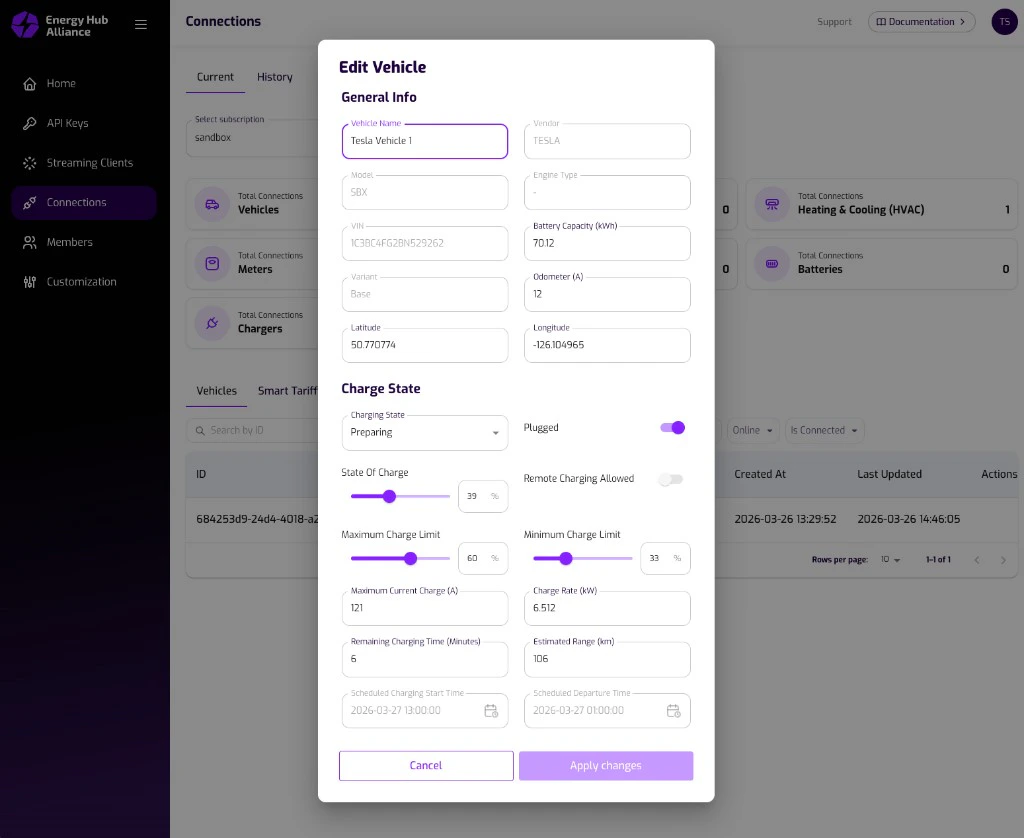
In the Partner Portal, navigate to a Sandbox subscription's device connections. Clicking on a linked virtual device opens an editing dialog where you can modify the device's data model.
The dialog displays the full data model of the device, organized into sections such as **General Info**, **Charge State**, and **Climate State**. Most fields can be freely edited to simulate any device scenario you need.
 ### Read-Only Fields
Some fields are managed by the system and cannot be edited manually:
| Field | Reason |
| ---------------- | -------------------------------------------------------- |
| **Last Updated** | Automatically set by the system when changes are applied |
| **Vendor** | Static value determined during the connect flow |
### Editable Fields
All other fields in the data model can be modified. For a vehicle, this includes fields such as vehicle name, model, VIN, battery capacity, charging state, state of charge, charge rate, temperatures, climate settings, and more. The complete data model is documented in the [Vehicle Data](/api-reference/vehicle-controller/vehicle-data) API reference.
## Applying Changes
Once you have adjusted the desired fields, click **Apply Changes**. This triggers the following:
1. The virtual device state is updated immediately with the new values.
2. A device **update** event is sent through the [streaming service](/documentation/streaming/events) right away, just as it would happen when a real device reports new data.
The streaming update message follows the same format and topic naming as
production events. Your application receives the update on the ` {subscriptionId}.{deviceType}.update` topic, allowing you to verify your
streaming integration end-to-end.
Use this feature to test edge cases in your application, for example by
setting a very low state of charge, toggling climate controls, or changing the
charging state -- all without needing a physical device.
### Read-Only Fields
Some fields are managed by the system and cannot be edited manually:
| Field | Reason |
| ---------------- | -------------------------------------------------------- |
| **Last Updated** | Automatically set by the system when changes are applied |
| **Vendor** | Static value determined during the connect flow |
### Editable Fields
All other fields in the data model can be modified. For a vehicle, this includes fields such as vehicle name, model, VIN, battery capacity, charging state, state of charge, charge rate, temperatures, climate settings, and more. The complete data model is documented in the [Vehicle Data](/api-reference/vehicle-controller/vehicle-data) API reference.
## Applying Changes
Once you have adjusted the desired fields, click **Apply Changes**. This triggers the following:
1. The virtual device state is updated immediately with the new values.
2. A device **update** event is sent through the [streaming service](/documentation/streaming/events) right away, just as it would happen when a real device reports new data.
The streaming update message follows the same format and topic naming as
production events. Your application receives the update on the ` {subscriptionId}.{deviceType}.update` topic, allowing you to verify your
streaming integration end-to-end.
Use this feature to test edge cases in your application, for example by
setting a very low state of charge, toggling climate controls, or changing the
charging state -- all without needing a physical device.